Match & Blast: A Match-3 Game With a Timer and a Prize on the Line
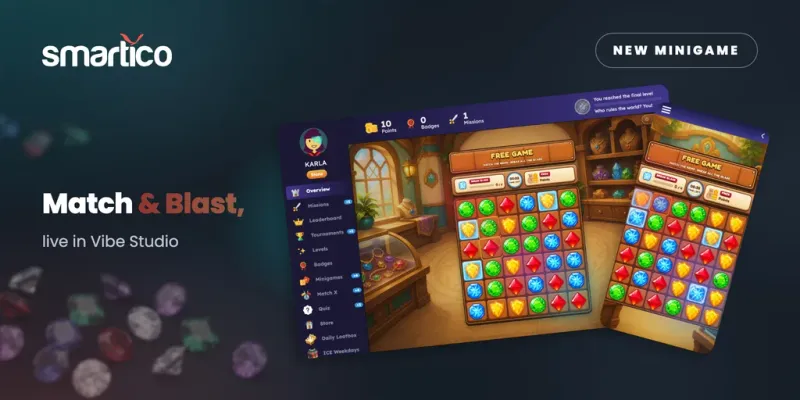
Match-3 is a format players already know how to play, which makes it a good fit for a quick promotion. Match & Blast brings it into Vibe Studio as a ready-to-use custom game: swap gems, break the glass, beat the clock.
It is the third custom game built on Smartico's Voyager mechanics this month, after Cross Hopper and Smash It!. Like the other two, it has a real lose condition, and the prize is awarded only if the player wins.
How a round plays
The player swaps two neighboring gems, horizontally or vertically, to make a line of three or more of the same kind. Matched gems disappear, the gems above fall down, and new ones drop in from the top. If the refill creates new matches, they clear automatically as a chain reaction.
Some tiles on the 5x5 board are covered with glass. Matching the gem underneath breaks the glass, and breaking all of it is the goal.
A round ends in one of two ways. If the player breaks all the glass before the timer runs out, they win the prize. If the time runs out first, they lose and receive no prize. The prize is drawn when the player clicks Start Game, so the outcome of the draw is set before the round begins, and the player keeps it only by clearing the board in time.
The start screen shows the game title, a short instruction, the available prizes, the Start Game button and the game rules.
What you can set
Two settings shape each round.
Difficulty. Easy gives the player 50 seconds to break all the glass, Medium gives 40 seconds and Hard gives 30.
Number of glass tiles. You set a minimum and a maximum number of glass tiles the player has to break. For each round, the game picks a number between the two.
Almost all standard Voyager mechanics work with Match & Blast. The two settings it does not support are Modifiers and Seed window (minutes).
Switching it on
Match & Blast is a global template, so there is no need to build anything in Vibe Studio first.
- In Gamification, open Mini-games and open your Voyager mini-game (or create one).
- Turn on the "Use Custom Game" toggle.
- In the Custom Game selector, choose the Match & Blast global template.
- Set the mini-game's status to Active.
The game has to match the mini-game it replaces. Match & Blast uses Voyager mechanics, so it belongs on a Voyager mini-game. A Loyalty Wheel, for example, needs a wheel-based game.
If Vibe Studio is not enabled for your brand yet, ask your Customer Success Manager.
Where the rules and prizes live
Smartico's Custom Games documentation draws a clear line between the two places you work. The mini-game template in Gamification, Mini-games is the source of truth for rewards, prize pools, odds, limits and eligibility. Vibe Studio holds the look and the interaction. You can link a different custom game later without touching your rewards.
Two practical points from the documentation. The preview plays real rounds: it uses the preview player's attempts, and prizes won there are really given to that player, so test with a test user. And translations live inside the custom game, so one game can serve several languages. Write "/translate" in the Vibe Studio chat and the AI agent handles it.
Ideas for using it
These are campaign ideas to consider, not product features:
- A quick reward for a returning player. A round takes under a minute at the longest setting, which suits a "welcome back" moment.
- The payoff for a challenge. Make a round the reward for finishing one of your daily or weekly missions.
- Two versions of the same game. Run one mini-game template on Easy for everyone and another on Hard for a segment you want to reward more, since each template has its own segment and prize settings.
See it in action
For the full setup details, see the release notes and the Custom Games documentation. To see Match & Blast and the rest of Vibe Studio running on live Smartico data, book a demo.
Did you find this article helpful? If so, consider sharing it with other industry professionals such as yourself.