


Presentamos los formularios: recopila datos de jugadores que fluyen directamente a tu CRM
.png)
Los mejores datos sobre tus jugadores provienen directamente de ellos. La nueva función de formularios de Smartico te permite solicitarlos directamente: detalles de perfil, respuestas a encuestas, consentimientos, preferencias y enviar cada envío a tu CRM en tiempo real, listo para actuar.
Definición de formularios
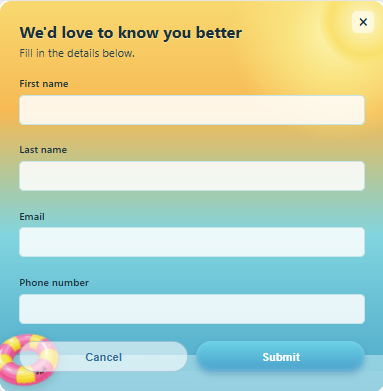
Forms es una herramienta interactiva de recopilación de datos integrada en el CRM automationde Smartico. Crea formularios personalizados, muéstralos a los jugadores adecuados a través de tus campañas y cada respuesta se asignará automáticamente a un perfil de jugador o a un atributo personalizado, gracias a tu motor de segmentación. Úsalos para actualizar perfiles, realizar encuestas, aceptar términos y condiciones, capturar preferencias y mucho más.
Qué puedes hacer con ellos
- Actualiza perfiles automáticamente. Conecta un campo a una propiedad existente (nombre, teléfono, fecha de nacimiento, idioma) y el perfil del jugador se actualizará en el momento en que envíe el formulario. O utiliza claves personalizadas para enviar datos únicos a las cargas útiles de tus campañas.
- Muestra formularios solo a los jugadores adecuados. Restringe cada formulario a un segmento específico para que los jugadores solo vean lo que es relevante para ellos.
- Mantén tus datos limpios. Las reglas de validación, los límites de caracteres, los rangos numéricos y los patrones regex personalizados evitan entradas incorrectas y garantizan formatos correctos para números de teléfono y correos electrónicos.
- Adapta tu marca, en cualquier idioma. Ajusta colores, diseño y textos, localiza etiquetas y botones en todos tus idiomas y previsualiza los cambios en tiempo real, lado a lado.
- Cinco tipos de campos. Texto, número, menú desplegable, casilla de verificación y fecha, con el formato de entrada adaptado a la propiedad que conectes.

Crea y diseña a tu manera con Vibe Studio
Forms se integra con Vibe Studio, por lo que puedes personalizar un formulario describiendo lo que quieres en lenguaje sencillo. Cambia el tema y los colores, genera e inserta gráficos, añade soporte multilingüe y observa cómo se actualiza en tu vista previa en segundos, sin necesidad de tocar una sola línea de código.
Se integra en tus campañas
Un formulario es una actividad que se añade a una campaña, junto con la gamificación, la mensajería y otros pasos. Actívalo en el momento adecuado del recorrido del jugador y, como los envíos llegan al CRM al instante, puedes ramificar una campaña según lo que haya respondido el jugador o introducir los nuevos datos directamente en tu siguiente segmento.
Consulta todos los envíos
La pestaña Envíos te permite ver, buscar y auditar cada respuesta, con todos los detalles de los campos que el jugador ha rellenado, y exportar los registros siempre que los necesites. Los datos de los formularios también están disponibles en el almacén de datos (Data Warehouse) para realizar informes más detallados.
La función de formularios ya está disponible en tu Back Office, en la pestaña Herramientas. Para ver cómo encaja en tu estrategia de datos de jugadores, reserva tu demostración de Smartico hoy mismo.
¿Listo para usar Smartico?
Únete a los cientos de empresas de todo el mundo que utilizan Smartico con sus jugadores.